
Your YAML files, queryable with SQL.
Your SQLite database, reviewable in git. YAMLite keeps YAML files, and Markdown or MDX front matter, in sync with SQLite in both directions, continuously.
Editing as a team? See YAMLite Cloud →
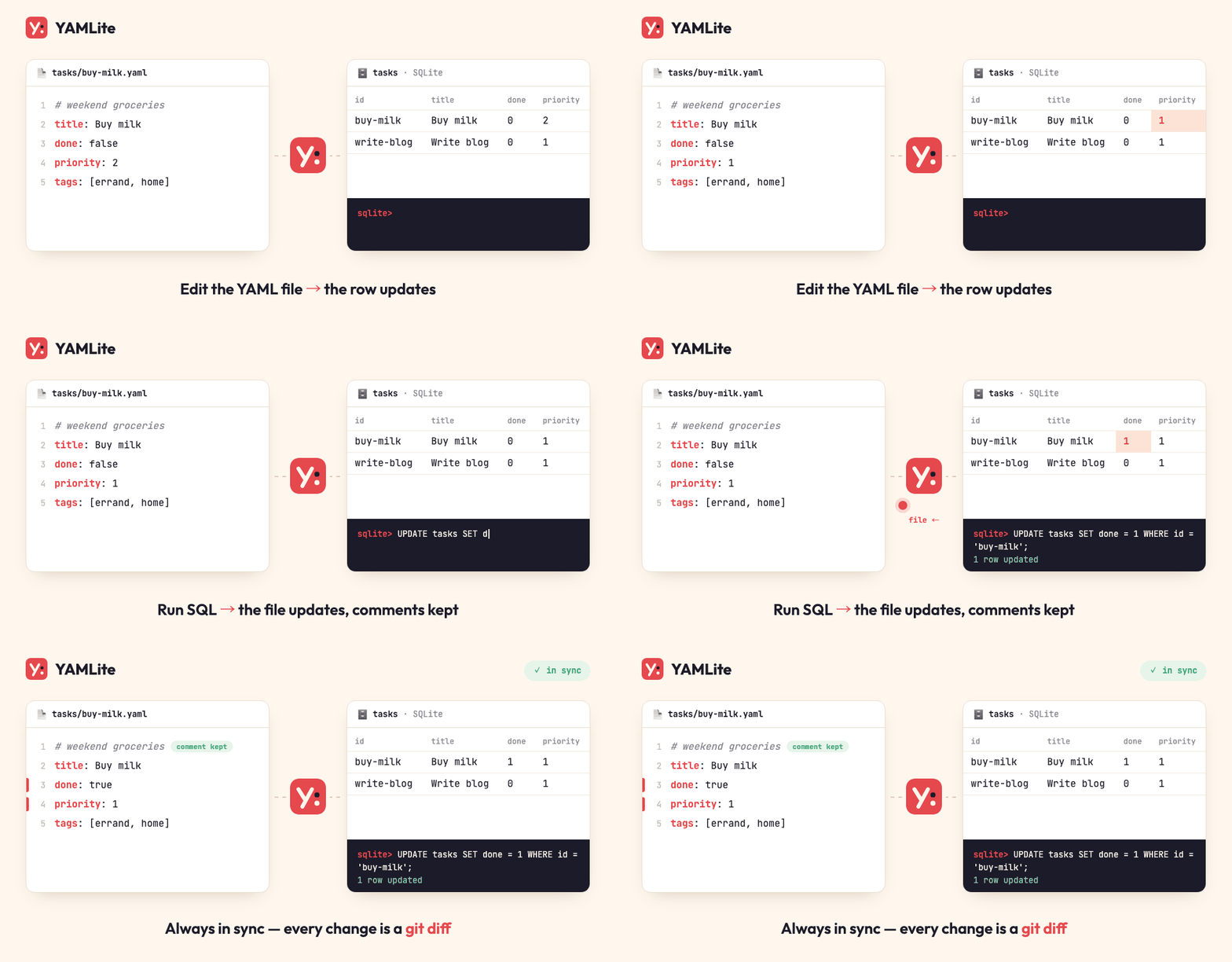
Keep YAML and SQLite without choosing one.
YAML is great for data humans write — readable, diffable, git-native. It is terrible to query. SQLite is the opposite.
- your editor
- YAML
- SQL
Hand-written data, SQL queries
Tasks, notes, contacts, configs, fixtures. Keep editing YAML; ask questions with SQL, Datasette, or any SQLite tool.
- your app
- SQLite
- git diff
App-written data, git history
Let a script or app write to SQLite and get every change as a reviewable YAML diff in a pull request.
Markdown too: front matter becomes columns.
Point a table at **/*.md or *.mdx. The YAML front matter becomes columns and the text below it a body column. Editing one leaves the other's bytes alone.
- An Obsidian vault, with notes at any depth
- Blog posts in
src/content/blog - MDX components and imports are kept as text, never run
tables:
  posts:
    files: "src/content/blog/**/*.mdx"
---
title: Hello, YAMLite
date: 2026-10-01
tags: [release]
draft: false
---

Our first post. <Callout>Hi!</Callout>
Small tool, careful about your files.
Two-way, continuous
yamlite watch reacts to file saves and to commits from any process writing the database.
Comments survive
Only changed fields are rewritten. Comments, key order and flow style stay put.
Typed columns
Booleans, integers, reals and JSON inferred from your data, pinned in one yamlite.yaml.
Safe by default
Broken YAML is never overwritten, mass deletions are refused, and the losing side of a conflict is backed up.
Rebuildable
The database is a cache. Delete it, run sync, and it comes back from YAML.
CLI and library
No native dependencies: built on Node's node:sqlite. Use the command or import { open }.
Rules and references
Declare required fields, allowed values, formats, bounds and references in yamlite.yaml; the UI and check warn about what breaks them.
Lists as rows
Lists inside records, like a project's milestones, become read-only SQL views you can join.
Query to CSV or JSON
yamlite query runs a SELECT without sqlite3 and prints a table, JSON or CSV.
yamlite serve — a whole admin for your folder.
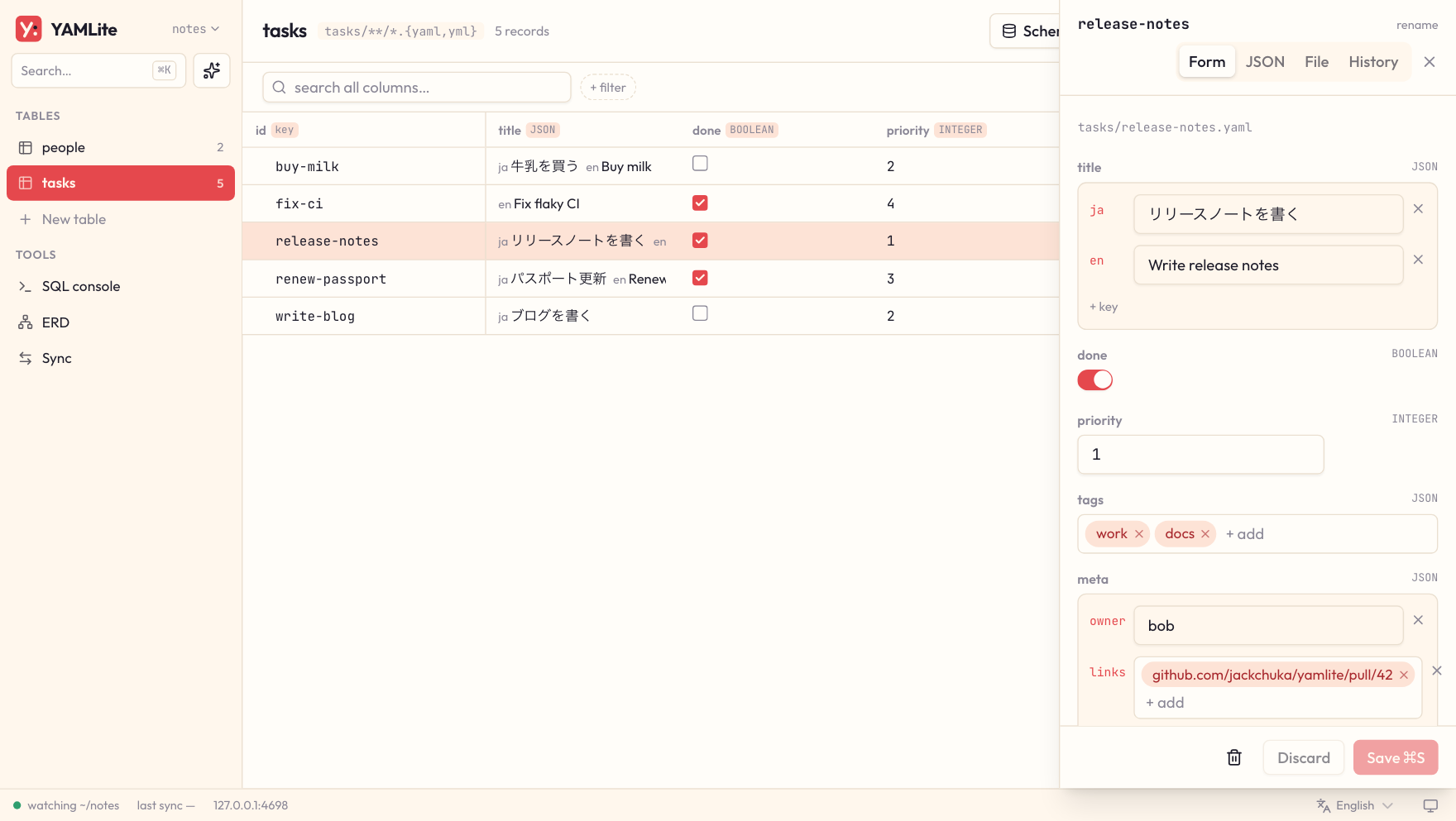
- Forms, ERD and SQLEdit records with forms that fit each column type, and see every table on one diagram.
- History per recordEvery git commit that changed a record, with a way to restore an older version.
- Send for reviewCommit, push and open a draft pull request from the sidebar.
- Ask AIClaude or GPT proposes changes with your own API key; nothing is written until you apply them.
- PagesAdd your own kanban board or dashboard as one HTML file.
Check it in CI, publish it, hand it to an agent.
Check every pull request
yamlite check fails on wrong values, missing fields, broken references or mismatched types. Run it in GitHub Actions or a pre-commit hook.
- run: npx yamlite check .
Publish a read-only site
yamlite export writes the web UI as a static site to browse, filter, see the ERD and run SELECT. Every URL is relative, so it works on GitHub Pages.
npx yamlite export .
Hand it to an AI agent
yamlite guide explains how to write yamlite.yaml for the installed version. Point a coding agent at it, or install it as an Agent Skill.
npx skills add yamlite-hq/yamlite
From a folder of YAML to SQL in a minute.
- 01
Infer a schema
yamlite init notes - 02
Preview
yamlite status notes - 03
Sync
yamlite sync notes - 04
Query
yamlite query "select …"
Your team, in the browser.
Open a GitHub repository and edit its YAML and Markdown with YAMLite's UI — nothing to install. Changes go to a draft pull request.
- Sign in with GitHub and pick a repository
- No yamlite.yaml yet? One is generated from your data and sent with your first pull request
- Your data goes only between your browser, GitHub and the AI provider you choose
- In preview and open by invitation; once invited, a 14-day free trial per GitHub account